I have finished the visiual side of the editing assignment, so now I must create the music for it using Garage Band. I am going to create a upbeat music track that will be mostly in time with the video. The sport Parkour is fast with pace, like the video I have created, so my music will be the same pace as the video to keep everything in time.
The Structure of my music is Binary form. (A,B,A) and will change Key Signiature from D,C,D. I have used a range of instrument loops that range from, a full drum kit,Bass, Piano and Gutair.
Friday, 27 January 2012

Editing (creating a narrative sequence)
I want to create a story telling video. The video clips that I am using arnt enough to tell a story spo the words i have created in After Effects will support them. I will be thinking about the shot size from one clip to another in the sequence of my video. Most of the videos are medium,close-up and extreme close-up. I will be also using footage that will be establish shots and profile shots as part of controling the story structure.
Most of the footage is bright sunlight footage but I will use this to my advantage. There are also video clips that are very dark, I will also work with the material I got and find a way to control the light change.
Unfortunatly the sound quality to the interviews are poor and cannot be saved/bettered , so I will not be able to use them in the video.
I have though long and hard to use credits or leave them out. My desicion is to not use credits as I think they should be the last thing a viewer should see at the end of a video.
Most of the footage is bright sunlight footage but I will use this to my advantage. There are also video clips that are very dark, I will also work with the material I got and find a way to control the light change.
Unfortunatly the sound quality to the interviews are poor and cannot be saved/bettered , so I will not be able to use them in the video.
I have though long and hard to use credits or leave them out. My desicion is to not use credits as I think they should be the last thing a viewer should see at the end of a video.
Creating words in After Effects and
I created mini word clips to display throughout the video. The idea of this is to tease the viewer/keep the interested to what the video is about with the support of the video clips of Parkour. The idea came from watching adverts on tv that I though looked affective in keeping viewers involved.

I have created other video effects using after effects ready to add to the final video.
Reference: www.jumputah.com/about.html

I have created other video effects using after effects ready to add to the final video.
Reference: www.jumputah.com/about.html
Thursday, 26 January 2012
Editing (transitions)
Today I added all the transitions in the video editing stage. I used only three types of video transitions throughout the video. I used: Fade black, Fade white and Film dissolve. I used these transitions because they made each transition smooth and flowing between each clip.
Research on Bitrate and frames
What is bitrate?
Biterate is usually measured in kb per second (kbps) and it is the amount of data stored for that second. The higher the bitrate the higher the quality is stored, but will increase the overall file size.
Sample rate for video is fps and the sample rate for audio is Hz.
Examples of bitrate size for different videos:

Audio bitrates:
Someone speaking 24kbps
Acoustic solo peformance 48kbps
Group peformance low quality 64kbps
Group peformance high quality 128kpbs
CD quality 256kpbs
Reference for audio bitrate: www.boutell.com/newfaq/creating/audiobitrate.html
Reference of video bitrate: http://www.ezs3.com/public/What_bitrate_should_I_use_when_encoding_my_video_How_do_I_optimize_my_video_for_the_web.cfm
Reference of audio bitrate:http://www.fastserv.com/kb/article/mp3_bitrate_selection_and_samples/
Reference of bitrate video: http://ddisoftware.com/tech/articles/march-2009-video-frame-rates-(24p-25p-30p-60i)/
Reference:http://searchnetworking.techtarget.com/definition/bit-rate
Biterate is usually measured in kb per second (kbps) and it is the amount of data stored for that second. The higher the bitrate the higher the quality is stored, but will increase the overall file size.
Sample rate for video is fps and the sample rate for audio is Hz.
Examples of bitrate size for different videos:
Audio bitrates:
Someone speaking 24kbps
Acoustic solo peformance 48kbps
Group peformance low quality 64kbps
Group peformance high quality 128kpbs
CD quality 256kpbs
Reference for audio bitrate: www.boutell.com/newfaq/creating/audiobitrate.html
Reference of video bitrate: http://www.ezs3.com/public/What_bitrate_should_I_use_when_encoding_my_video_How_do_I_optimize_my_video_for_the_web.cfm
Reference of audio bitrate:http://www.fastserv.com/kb/article/mp3_bitrate_selection_and_samples/
Reference of bitrate video: http://ddisoftware.com/tech/articles/march-2009-video-frame-rates-(24p-25p-30p-60i)/
Reference:http://searchnetworking.techtarget.com/definition/bit-rate
Research of Downloading
What is Downloading?
Downloading is transferring a file from a sever/computer to another computer. When you download a file you have to wait for it to finish downloading before using/watching it. The time opf downloading depends on the file size.
If a user downloads a video for example, that user would have to wait a period of time for it to transfer all the data onto the users computer. Download means it is a perminant download/document at the end of the process.
Reference:http://searchnetworking.techtarget.com/definition/downloading
Downloading is transferring a file from a sever/computer to another computer. When you download a file you have to wait for it to finish downloading before using/watching it. The time opf downloading depends on the file size.
If a user downloads a video for example, that user would have to wait a period of time for it to transfer all the data onto the users computer. Download means it is a perminant download/document at the end of the process.
Reference:http://searchnetworking.techtarget.com/definition/downloading
Research on Progressive Downloading, Analog and Digital, and Interlaced Video
What is Progressive Downloading?
It allows the user instantly start watching the video that they click on before it finishes downloading. It works the same way as Streaming method but the disadvantage of Progressive downloading is that the user can not navigate around the video. The video downloads from start to finish and they can not jump through the video.
The process of progressive download can be slowed down if the users Internet connection is not fast, this will cause the effect of having to wait longer for the video to load before the user can watch it. The file size will also contribute to slower process.
Progressive download is not permanent and when a user refreshes or leaves the page but then goes back 10minutes later to watch the video again, they will have to wait for the process of buffering to download again.
I watched a video that talked about Progressive download as part of my research for Streaming and Progressive Downloading.
Reference: http://www.youtube.com/watch?v=2cbXxyr0DCY&feature=player_embedded
Reference: http://whatis.techtarget.com/definition/progressive-download.html
About Interlaced Video
Today's broadcast television is displayed by using an archaic technique called interlaced video. Television experimenters had considerable problems in making the scan lines draw neatly together close enough to make a image. So they created a video frame that is composed of two fields. each of the fields contain one-half of the frame. The first field contains the odd lines of the frame and the second field contains the even lines. together, the fields interlace in broadcast. The odd lines are broadcast before the even lines.(one third of a second later), but we don't see this happening, so we see the final result of one image. This process can be developed as it is messy but it would be enormous cost for the broadcast system of a estimate of more than $35 billion.
There is another approach to this called Progressive video which keeps all the lines together that make up the frame in one place. The benefits of this is the result of a much crispier image, which is often used in film.
"p" in "24pHDTV" stands for "progressive" which substantially helps the new high-definition video to emulate film.
The difference between Analog and Digital
The problem with analog systems is that they are not good at recreating exactly the same phenomenon twice. But the new system for Digital take a very different approach. The horizontal and vertical lines approach begin to turn the image into a series of fixed points. The more lines there are, the more pixels the image is made up of the better the definition/resolution of the image. Pixels are made up of various colours, each a single, unitary piece of information. This is digital image which is capable of exact reproduction of display every copy identical to the original.
Reference: Benedetti, R, Brown, M, Laramie, B, Williams, P 2004, pp.34,35,Creative postproduction, Pearson Education,Inc.
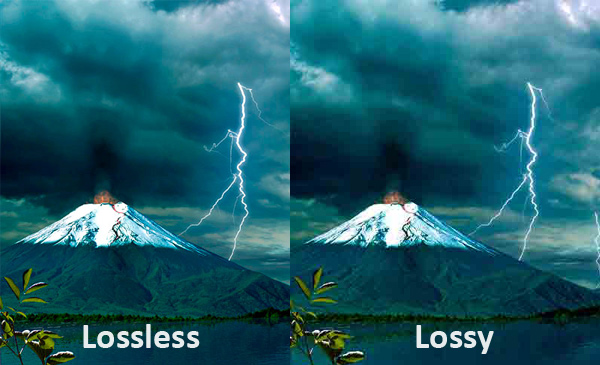
Example of Interlaced:

Reference of image:http://www.pxleyes.com/blog/wp-content/uploads/essential-video-formats-for-cg-artists/lossless1.jpg
It allows the user instantly start watching the video that they click on before it finishes downloading. It works the same way as Streaming method but the disadvantage of Progressive downloading is that the user can not navigate around the video. The video downloads from start to finish and they can not jump through the video.
The process of progressive download can be slowed down if the users Internet connection is not fast, this will cause the effect of having to wait longer for the video to load before the user can watch it. The file size will also contribute to slower process.
Progressive download is not permanent and when a user refreshes or leaves the page but then goes back 10minutes later to watch the video again, they will have to wait for the process of buffering to download again.
I watched a video that talked about Progressive download as part of my research for Streaming and Progressive Downloading.
Reference: http://www.youtube.com/watch?v=2cbXxyr0DCY&feature=player_embedded
Reference: http://whatis.techtarget.com/definition/progressive-download.html
About Interlaced Video
Today's broadcast television is displayed by using an archaic technique called interlaced video. Television experimenters had considerable problems in making the scan lines draw neatly together close enough to make a image. So they created a video frame that is composed of two fields. each of the fields contain one-half of the frame. The first field contains the odd lines of the frame and the second field contains the even lines. together, the fields interlace in broadcast. The odd lines are broadcast before the even lines.(one third of a second later), but we don't see this happening, so we see the final result of one image. This process can be developed as it is messy but it would be enormous cost for the broadcast system of a estimate of more than $35 billion.
There is another approach to this called Progressive video which keeps all the lines together that make up the frame in one place. The benefits of this is the result of a much crispier image, which is often used in film.
"p" in "24pHDTV" stands for "progressive" which substantially helps the new high-definition video to emulate film.
The difference between Analog and Digital
The problem with analog systems is that they are not good at recreating exactly the same phenomenon twice. But the new system for Digital take a very different approach. The horizontal and vertical lines approach begin to turn the image into a series of fixed points. The more lines there are, the more pixels the image is made up of the better the definition/resolution of the image. Pixels are made up of various colours, each a single, unitary piece of information. This is digital image which is capable of exact reproduction of display every copy identical to the original.
Reference: Benedetti, R, Brown, M, Laramie, B, Williams, P 2004, pp.34,35,Creative postproduction, Pearson Education,Inc.
Example of Interlaced:

Reference of image:http://www.pxleyes.com/blog/wp-content/uploads/essential-video-formats-for-cg-artists/lossless1.jpg
Tuesday, 10 January 2012
Planning of video
I want my video to start with a professional black themed introduction with fast flashing videos of people jumping using affects such as fade in white and black. I will make the length of my introduction approx. 10secs long that will then link in to the main part of the video.
I will be using the software AfterAffects and Premiere transitions to create it. When I create the title opening it may change slightly throughout the development stage.
My planning structure for the video


I will be using the software AfterAffects and Premiere transitions to create it. When I create the title opening it may change slightly throughout the development stage.
My planning structure for the video


Monday, 9 January 2012
Editing in Premiere and audio
Over the Christmas period I have carried on with editing the videos by colour correcting them, using effects and linking the videos together to folow nice with the changing of speed. I focused on the frame shot between each video.
I started to make the audio for my video using the software Garage Band. I went through the different sound loops and experimented with different ones.
I will be producing the music last so that I can import the final video into Garage Band to time and structure out the music to the video.
I started to make the audio for my video using the software Garage Band. I went through the different sound loops and experimented with different ones.
I will be producing the music last so that I can import the final video into Garage Band to time and structure out the music to the video.
Subscribe to:
Posts (Atom)